IntelliJ IDEA datasheet
What does a professional Java and Kotlin IDE include before you install a single plugin? The IntelliJ IDEA datasheet from JetBrains answers that question. It outlines the smart editor, debugger, profiler, database tools, and AI-powered coding assistance built in. Download the datasheet to see how Gravity Computers Inc. can help your team move faster on large codebases.
What makes this IDE a good fit for professional Java and Kotlin development?
This IDE is designed specifically for professional Java and Kotlin work, helping teams write code faster and maintain quality over time.
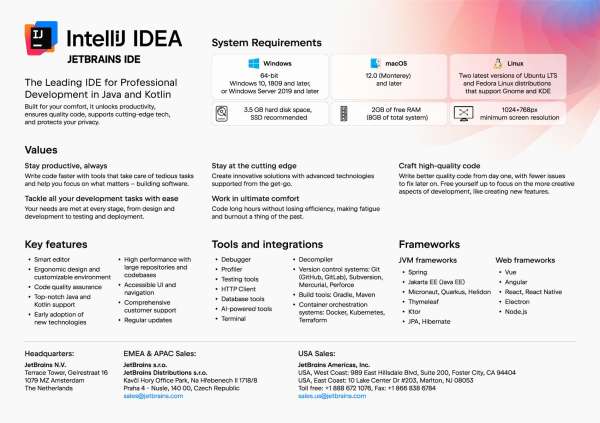
- Deep Java and Kotlin support: Built-in understanding of JVM languages, including frameworks such as Spring, Jakarta EE (Java EE), Micronaut, Quarkus, Helidon, Thymeleaf, Ktor, JPA, and Hibernate.
- Modern web and JS stack: Support for Vue, Angular, React, React Native, Electron, and Node.js, so full-stack teams can stay in one environment.
- End-to-end development flow: Tools for design, development, testing, debugging, profiling, and deployment are integrated, so you don’t have to juggle multiple apps.
- Built-in tools: Debugger, profiler, testing tools, HTTP client, database tools, AI-powered assistant, terminal, decompiler, and version control integration.
- Version control & build tools: Works smoothly with Git (GitHub, GitLab), Subversion, Mercurial, Perforce and build tools like Gradle and Maven.
- Cloud & DevOps alignment: Integrations with Docker, Kubernetes, and Terraform help teams reimagine how they build and ship JVM services.
The result is an environment that helps you focus on building software instead of managing tools.
How does the IDE improve productivity and code quality day to day?
The IDE is built to keep you productive while supporting better engineering practices from day one.
- Smart editor and ergonomic design: The editor is optimized for long coding sessions, with a customizable environment that helps reduce fatigue and burnout.
- Automation of tedious tasks: Many repetitive activities are handled for you, so you can focus on higher-value work like designing features and architecture.
- Code quality assistance: Built-in inspections and guidance help you write better quality code from the start, so there are fewer issues to fix later.
- High performance on large codebases: The IDE is tuned for large repositories and complex codebases, so navigation and refactoring stay responsive.
- Accessible UI and navigation: Clear navigation and an accessible interface make it easier to move through projects and onboard new team members.
- Regular updates and early tech adoption: The product keeps pace with new Java, Kotlin, and ecosystem technologies, helping teams stay current without constantly switching tools.
Together, these capabilities help teams rethink how they approach everyday development work, from quick fixes to large-scale refactors.
What platforms and system requirements does the IDE support?
The IDE is available across major desktop platforms with clear baseline requirements.
Supported operating systems
- Windows: 64-bit Windows 10 (version 1809 and later) or Windows Server 2019 and later
- macOS: macOS 12.0 (Monterey) and later
- Linux: The two latest versions of Ubuntu LTS and Fedora distributions that support Gnome and KDE
Minimum hardware requirements
- Disk space: About 3.5 GB of hard disk space (SSD recommended for better performance)
- Memory: At least 2 GB of free RAM (with 8 GB total system RAM recommended)
- Display: Minimum screen resolution of 1024×768 px
With these specs, teams can comfortably run the IDE alongside other tools, making it easier to reimagine their development workflow without major hardware upgrades.
IntelliJ IDEA datasheet
published by Gravity Computers Inc.
We LOVE what we do and we'll help your business find IT success. We'll get your computers, network, and servers in shape and keep your staff happy.
We go the distance to build technology solutions for your business.
Gravity Computers is an award winning IT Service company. Our past awards and achievements include Consumer Choice Award (in two consecutive years), BIV Fastest Growing Companies (2 years), A+ Rating with the BBB, and lots of Microsoft certifications along our 17 year history. We are Canadian and provide service throughout North America with the majority of our clients in Vancouver, BC, and the Lower Mainland.
Our boutique-like service supports Small and Medium Businesses from 1 to 150 users with the majority of our clients in the the middle range. We help with all aspects of IT from planning, deployment, programming, web development, server management, desktop helpdesk support and more.



 Sign in with LinkedIn